Showing posts with label GUI. Show all posts

Friday, 30 January 2009

Cognitive Modelling: Norman's 'Designer's Model'


Currently I am reading About Face 3 (Cooper et al.). In chapter 2 it deals with the existing position, dictated by software, of humans having to understand how computers 'logically' behave. Interaction design aims to rebalance digital products in favour of the human rather than the machine. By facilitating clearer cognitive behavioural understanding in the user, interactions can be made more beneficial to the user. Where this chapter really begins to become useful is in its explanation of conceptual models in order to visualise how humans and computers work.

The first model Donald Norman refers to as the system model. This is the cognitive model that explains the processing structure of the code. About Face 3 prefers to refer to it as the implementation model.

How code processes its actions and how human beings believe a computer/device/machine works are not the same. The human's mental model of how it works can be simplistic, counter-intuitive, fanciful, inaccurate, illogical; but as long as it helps the human successfully use their computer/device/machine it doesn't matter to them. Where a lot of problems arise within interactivity is the chasm that can form because these two mental models are representationally different. One is a mapping of actual processes - 'implementation', the other is purely notional - 'explanation'.

To interface between 'implementation' and 'explanation' a third model arises, a model that Donald Norman refers to as the designer's model, and Cooper et al refers to as a represented model. A designer's model that maps closer to a system/implementation model maybe more 'accurate' to the actual mechanics of processing, but is cognitively problematic to human users [A in diagram].

A successful interface is one where a user can see how their "goals and needs can be met" (Cooper et al, 2007, p32). This is achieved through making the designer's model follow as closely as possible the users' perceptions of how they believe they access the content [C in diagram].

There is nothing ground-breaking here in regard to interaction design, but it is the first time I have come across these definitions. I have known of the butler metaphor (Isaacs & Walendowski, 2002) but Cooper and Norman's models give it a more theoretical depth. Below is an expansion of the diagram in About Face 3 on page 30, with my annotations that link it back to my recent paper on the location of the graphic designer in GUI design.


Norman's designer's model and Cooper et al's similar represented model helps to give a cognitive psychological and theoretical base to the role that underpins the work of interface designers. In my paper I wrote about and cited Gillian Crampton Smith, former school director of Interaction Design Institute Ivrea. She sees the "graphic designers’ role as more involved in the interactive design process 'designing what a package is and what it does, and then designing what it will be like' (Aymer, 2001a, p33)". Graphic designers as part of their practice alternate between the “consideration of objective information and intuitive leaps” (Frascara, 2006, p32) in order to arrive at successful visual solutions. Graphic design, when performed well, can “inspire a behavourial change” in its audiences (Forlizzi & Lebbon, 2006, p53). These three points I raised and discussed in my paper can now also be assessed within the framework of the designer's model, and how effective are visual solutions when measured against the user's mental models.


References:

AYMER, G. (2001)a Norman Cooking. Create Online. 8. p38-40

COOPER, A., REIMAN, R. and CRONIN, D. (2007) About Face 3: The Essentials of Interaction Design. Indianapolis: Wiley Publishing Inc.

FRASCARA, J. (2006) Graphic Design: Fine Art or Social Science. In: A. BENNETT, ed. Design Studies: Theory and Research in Graphic Design - A Reader. New York: Princeton Architectural Press, p26-35

FORLIZZI, J. and LEBBON, C. (2006) From Formalism to Social Significance in Communication Design. In: A. BENNETT, ed. Design Studies: Theory and Research in Graphic Design - A Reader. New York: Princeton Architectural Press, p51-63

ISAACS, E. & WALENDOWSKI, A. (2002)Designing from Both Sides of the Screen: How Designers and Engineers Can Collaborate to Build Cooperative Technology. New Riders Publishing

Back to Top

Monday, 12 January 2009

Where’s the graphic designer in the graphical user interface?

It's been a while since I last posted as I had a paper to research and write. The paper "Where’s the graphic designer in the graphical user interface?" informs my contextual review and the findings within it aid the positioning of myself within interaction design research from a visual communication perspective.

I will only give a summary here and briefly outline my intention for its use.

The paper charts the involvement of graphic designers within the development of graphical user interfaces (GUI) across software and online/offline digital products since the 1970s. This is in order to discover what influence and involvement graphic design, as a discipline, now bears upon interaction design. The paper is limited to 3,000 words and so does not go into the history of GUI development.
The paper can be downloaded here as a pdf.

To support the paper I wish to add here some images that were useful to my research. The paper is intentionally unillustrated as, although it is about a visual medium, I wished the text to position the past, current and future state of graphic designers' involvement before I then move the research onto actual practioners. Therefore the images I am posting below are the starting point for the next paper I propose upon this research. This will then form the first part of my contextual study moving deeper into interaction design literature, before exploring the other areas of the diagram in previous posts.

A History of the GUI Timeline


Jeremy Reimer
arstechnica.com/articles/paedia/gui.ars/8 | Published: May 05, 2005

Original Apple Icon Graphics
Susan Kare


Original Apple MacPaint Graphics
Susan Kare


Original Apple Typography
Susan Kare


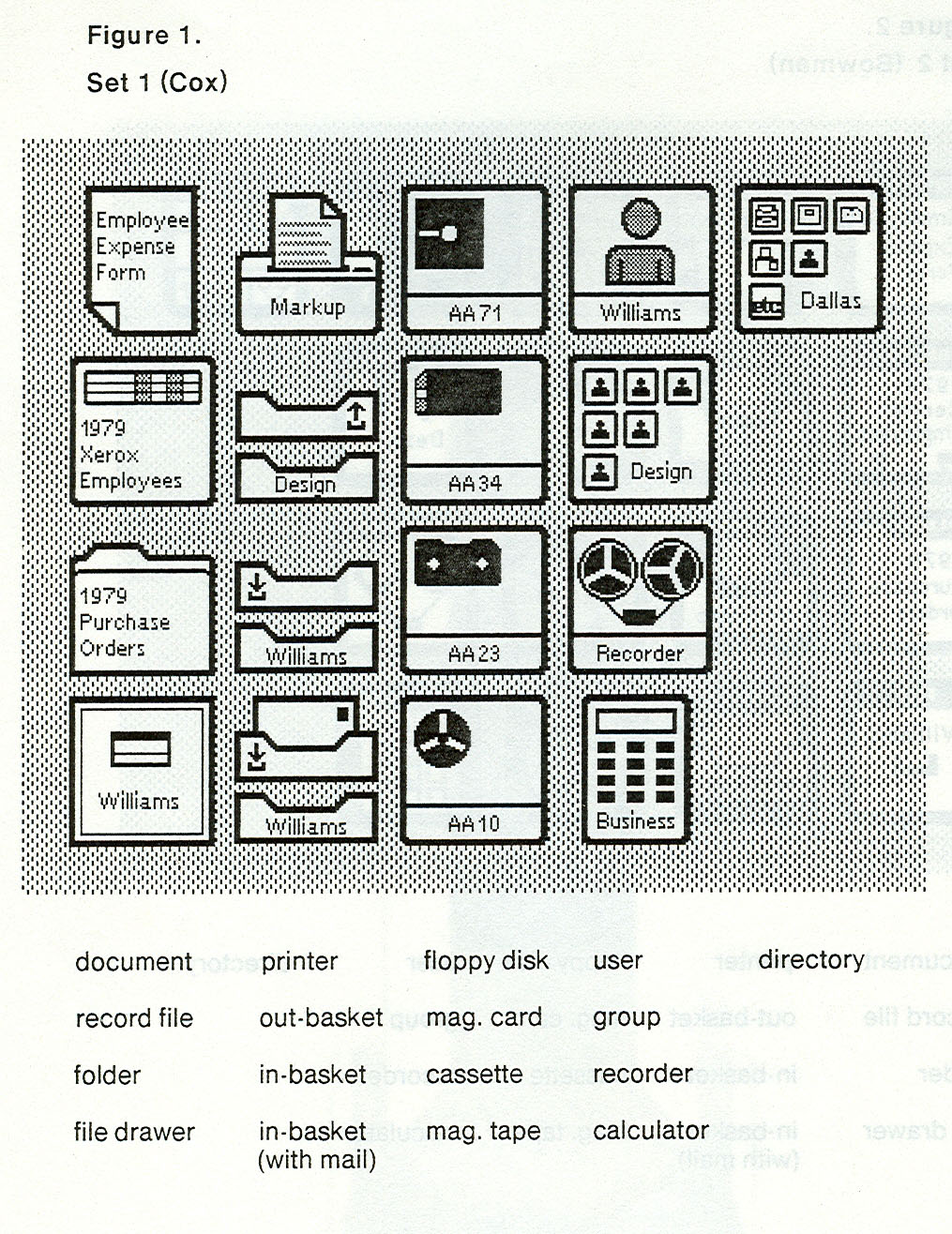
Xerox Star GUI Icon Ideas (circa 1979)
Norm Cox


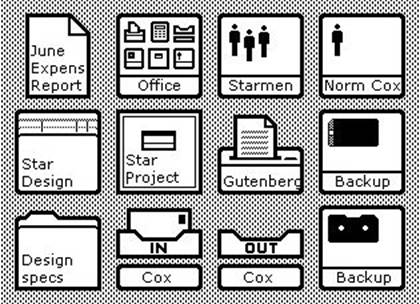
Xerox Star Final Icons (circa 1980)
Norm Cox et al

Sunday, 2 December 2007

A horse and cart epiphany

Christmas deadlines are approaching and I am just assessing assignments for a recent module I taught on Graphical Interface Design. The students from Sony Computer Entertainment in Liverpool, predominantly games testers, had to build a working prototype for the front-end of a game. The game itself was a concept that they had devised as a team in an earlier module. To illustrate their game idea they had previously built in-game 3D assets, characters and environments; ultimately making a FMV (full motion video) to demonstrate the tone and pace of the proposed gameplay. As part of my Interface module the students individually used the created assets to visualize the game's graphical user interface.

On the surface this wasn't a challenging design problem. GUIs are easy to build aren't they!? Just join some screens together with a few buttons over the top of an in-game graphic. That'll do. Surely? Game GUI's sometimes are just last minute bolt-ons; the little plain sister always in the shadow of its sexier gameplay sibling, where a convoluted and behemoth navigation path is imposed over a 3D graphic and a cool-looking logo. Hey-presto, that'll do… As my students test games professionally for Sony they are quite adept at uncovering bad usability. As a lecturer in interface design I personally do not adhere to the previous attitude towards GUI design. The students were a dream to work with as neither did they.

Through a series of practical sessions and lectures I engaged the students in the iterative process of conceptualising, prototyping and testing their interface concepts, until they arrive at a final working prototype. From initial brainstorms on what makes a good (and bad) game interface, we explored how a typical existing title structures its navigation through the many different screens of variables, from the first screen to the game starting. The tools we used to do this was both hi- and low-tech: an xBox 360ยบ; a digital projector; a small, dark, airtight room (>gasp<); several games; Blu-Tack; string (pink, don't ask); scissors and post-it notes.

Through this back-engineering of an existing interface's information architecture the students began to see how interactive theory actually applied itself. The task was playful yet illuminating. Although the exercise was challenging the students worked well as a group to achieve a tangible diagram. We then consequently ripped the post-its and string navigation apart, reconstructing a new 'ideal' information architecture from the remains, discarding and relocating content on the fly. This playful, team-based exercise was the first step in a process for them to develop their own individual interface structure and design through constant prototyping and testing. In his book The Art of Innovation Tom Kelley from IDEO comments on this playful experimentation as a process we "understood as children and lost it gradually as we matured". IDEO has a far-reaching impact within the design world, a company so enthusiastic about design they happily evangelize their working methodology for cross-disciplinary team-based iterative design. One such UK company that embraces this cross-disciplinary approach to design with aplomb is Brahm based in Leeds, with whom I have an invitation to visit. Now that I have a brief respite from a busy schedule at work, I should see if Brahm can fit me in for a pre-Christmas tour. But I digress.

The final student submissions are all the more successful for the many iterations they individually took to get to the final product. They all used Flash as a fast prototyping tool, to get the functionality into their prototype to demonstrate to a programmer how the visual interface should work. The visual assets they produced conformed to the 2x ratio for textures the games industry use, so that their designs could (in practice) use the smallest amount of scalable assets to create a final game front-end. Overall the students gained a valuable practical and theoretical insight into the production of a game's GUI, and has awakened them to the value of redesigning and retesting their designs through small iterative steps in order to achieve their final product. That is always good to see. At least this group wont be fooled into shoe-horning a navigational system around a piece of graphic imagery. They now know the cart goes behind the horse.